![Trustero_Logo_RGB_1C.png]](https://support.trustero.com/hs-fs/hubfs/Trustero_Logo_RGB_1C.png?height=40&name=Trustero_Logo_RGB_1C.png)
Trustero allows you to monitor the progress of controls while they are being tested by Trustero Intelligence.
As each control test is processed, the status window displays updates about the current stage of the test. If a control has multiple test procedures, you will see progress updates for each procedure as they are processed in parallel.
When a test procedure is completed, its results appear in the corresponding section of the status window. After all test procedures are complete, the summary and final control test results are displayed.
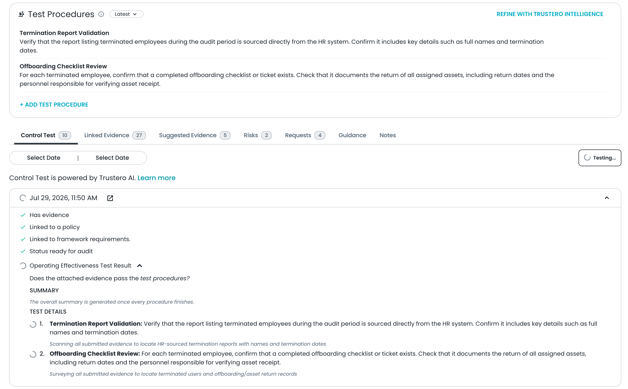
In-Progress Status from Control Page
Viewing the Status of Multiple Control Tests
When running tests for multiple controls, you can monitor their overall progress from the Control Testing page.
The icon next to each control indicates its current status:
- Hourglass: The control test is waiting in the processing queue and has not started.
- Spinner: The control test is actively being processed. Expand the control to view detailed progress updates.
- Pass or fail icon: The control test has been completed and the final result is available.
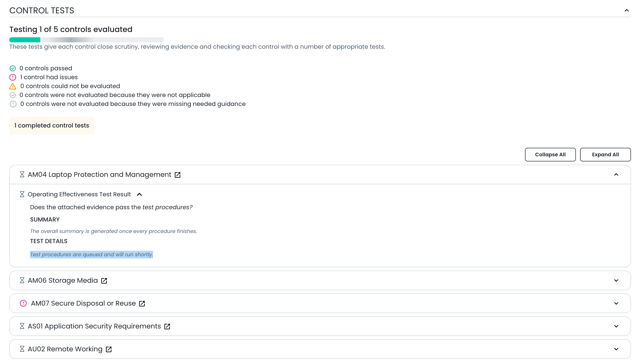
In-Progress Status from Control Testing Page
Queued Control Tests
When a control test is first initiated, you may see the following message:
Test procedures are queued and will run shortly.
When a large number of control tests are started at the same time, Trustero processes a limited number concurrently. For example, you may see 20 or 30 controls actively being processed while the remaining tests stay in the queue until processing resources become available.
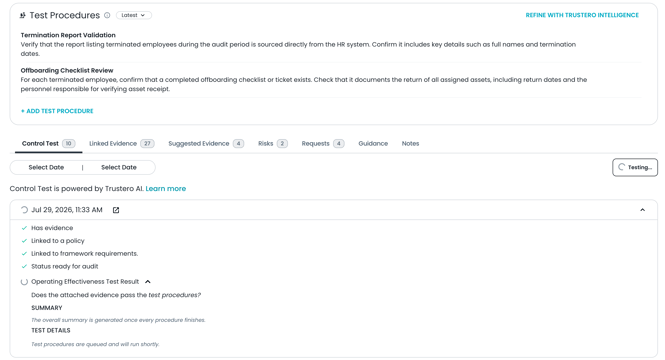 Status when Control is Queued for Processing