![Trustero_Logo_RGB_1C.png]](https://support.trustero.com/hs-fs/hubfs/Trustero_Logo_RGB_1C.png?height=40&name=Trustero_Logo_RGB_1C.png)
Marking control test results as Reviewed provides a simple way to track which AI-generated results have been reviewed.
The Reviewed status:
- Indicates that a user has reviewed the AI-generated result
- Does not affect control status or reporting elsewhere in the application
- Serves only as a tracking mechanism
How to Mark Test Results as Reviewed
- Hover over the control test result.
- Click Mark as Reviewed.
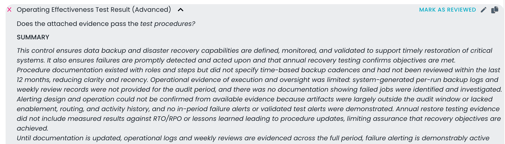
Mark Control Test as Reviewed
Once marked, a Reviewed badge appears:
- Next to the individual test
- At the overall status level
To undo this action:
- Click Mark as Pending Review to return the test to an unreviewed state.

Clear Review Status
Override Control Test Results
Overriding a control test result allows you to adjust the AI-generated outcome and provide justification for the change.
You can override results in either direction:
- Passing → Issues Found
- Issues Found → Passing
Important: Overridden results affect how the control is displayed across the application, including:
- Control list page
- Operating effectiveness dashboards and reports
How to Override a Control Test Result
- Click the edit (pencil) icon next to the control test.
- Select a new result from the dropdown.
- Enter a reason for the override.
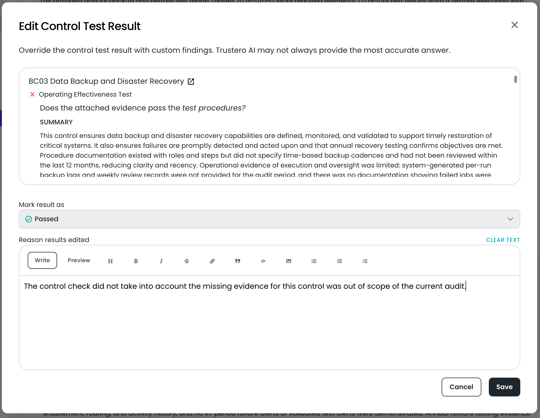
Override Control Test Results
Once saved:
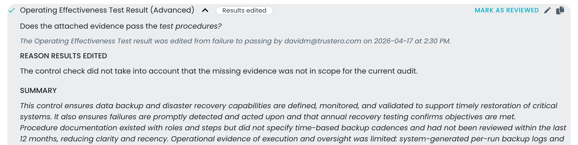
- The override reason appears in the control test summary
- An indicator shows that the result has been manually edited