![Trustero_Logo_RGB_1C.png]](https://support.trustero.com/hs-fs/hubfs/Trustero_Logo_RGB_1C.png?height=40&name=Trustero_Logo_RGB_1C.png)
Trustero provides multiple methods for exporting account information to support reporting, documentation, and audit readiness. Data can be exported from centralized locations as well as from content-specific pages throughout the platform.
Exporting From the Main Dashboard
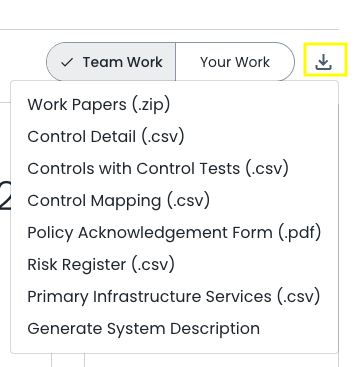
The primary location for initiating account-wide exports is the Download arrow icon in the upper-right corner of the Compliance Dashboard.
Selecting this icon opens a menu offering several export types, including:
- Control Detail (CSV)
- Controls with Control Tests (CSV)
- Control Mapping (CSV)
- Risk Register (CSV)
- Primary Infrastructure Services (CSV)
- Work Papers (ZIP) — a complete export of all content within the account
- Scope Documents — such as custom-generated System Descriptions
- Policy Acknowledgement Form (PDF) — generated with tenant-specific details
These exports provide comprehensive snapshots of GRC program data for internal or external stakeholders.
Exporting From Index Pages
Exports can also be initiated directly from relevant index pages throughout the account.
Examples include:
- The Control Detail CSV export accessible from the Control Index page
- The Risk Register export available on the Risk Register Index page
- Additional bulk export reports available for Vendors, and Requests, where applicable
These options support efficient retrieval of specific datasets.
Exporting From Reporting Dashboards
Data displayed in reporting dashboards can also be exported for distribution or documentation purposes. On dashboards such as Operating Effectiveness Overview, Operating Effectiveness Detail, and Risk Response, the printer icon in the upper-right corner of the active dashboard tab can be selected.
Choosing this option provides the ability to:
- Download as a PDF the data and visualizations displayed, or
- Print the displayed data and visualizations directly
This enables quick generation of presentation-ready summaries and supporting materials for stakeholders.
Accessing Templates for Bulk Uploads
Index pages also contain downloadable CSV templates that support structured bulk uploads of account content, and enable round-trip content updates. Templates are available for items such as:
- Controls
- Risks
- Vendors
- Requests
- Questionnaires
- Q&A Knowledge Base
Using these templates ensures proper formatting and facilitates efficient onboarding and data updates.