![Trustero_Logo_RGB_1C.png]](https://support.trustero.com/hs-fs/hubfs/Trustero_Logo_RGB_1C.png?height=40&name=Trustero_Logo_RGB_1C.png)
Content Management / Control Checks
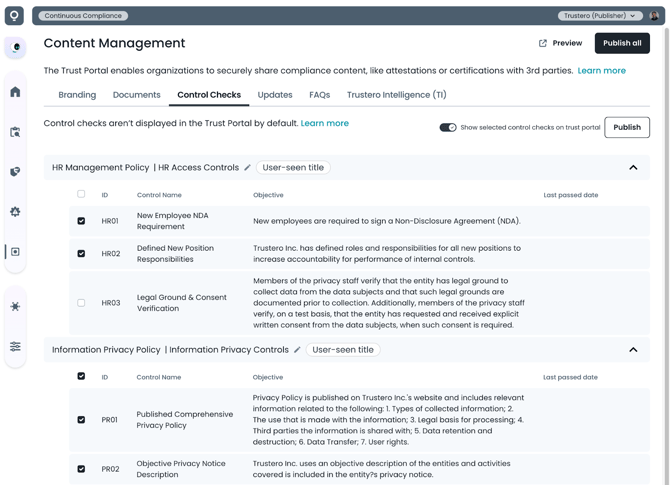
This tab lets publishers enable a curated view of their internal controls that their visitors can view and search (this feature is disabled by default).
If the Trustero Intelligence feature is enabled for visitors, they will be able to use AI to ask questions about the published control checks once they have been granted access.
Getting Started
- Trust Portal Publishers (or Admins) go to the app; navigate to Customer Trust / Content Management / Control Checks tab
- Configure which control checks should be visible to visitors by selecting check box next to control
- "Last passed date" will not be visible to visitors, and is only available for informational purposes in the Publisher view.
- Override the control name and objective (description) that will be displayed on the visitor site
- There is an AI helper button in the editor that can summarize the control objective to be more concise and readable
- Controls are grouped by their parent policy, but the title of this group can be edited to be more understandable
- Enable control check visibility on portal (click the "Show selected control checks on trust portal" toggle)
- Preview site to make sure control check content is correct
- Publish control check changes (if other features are going to be enabled, you may want to wait until the entire portal is configured before clicking Publish All)
Example Page