![Trustero_Logo_RGB_1C.png]](https://support.trustero.com/hs-fs/hubfs/Trustero_Logo_RGB_1C.png?height=40&name=Trustero_Logo_RGB_1C.png)
Access Management / Visitor Analytics
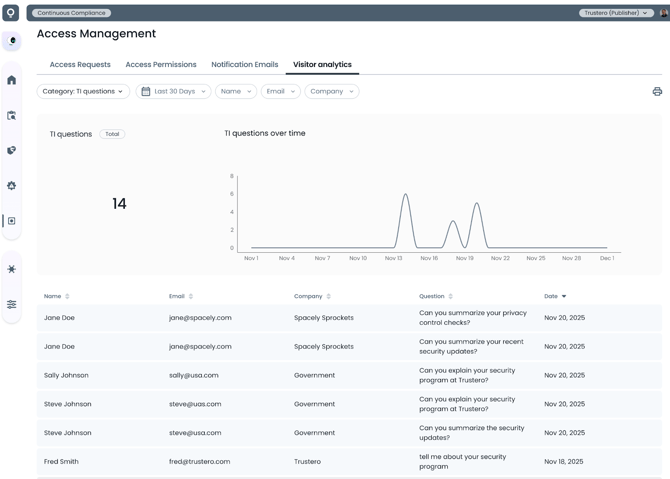
The Trust Portal visitor site tracks various events that can be viewed in the Visitor Analytics tab. Daily summary counts for each event type are tracked, as well as details for the event during the time period.
Getting Started
- Trust Portal Publishers, Trust Portal Approvers (or Admins) go to the app; navigate to Customer Trust / Access Management / Visitor Analytics tab
- Select one of the available analytics categories from the left most drop-down menu
- Access requests - How many visitors requested access to documents
- Granted requests - How many visitors were granted access
- Documents downloaded - How many documents were downloaded, which documents were downloaded
- FAQs clicked - How often were FAQs viewed and which FAQs were expanded
- Searches - How often were searches performed, and what was searched for
- TI chats - How often was the TI chat feature accessed
- TI questions - How many questions were asked, and what was the text of the question
- Subscribed to updates - How many people subscribed to updates
- Unsubscribed from updates - How many people unsubscribed from updates
- The default time range shows the past 30 days, but that can be adjusted to a longer period or custom time range
Example Page